


BORIS Integrations: Connect Your Field Service Workflows
For field service businesses, integration capabilities matter. Your teams work across multiple systems—accounting software, mobile devices, scheduling platforms, customer databases—and manual data entry between them is where inefficiency and human error thrive.
The challenge, however, is knowing which integrations you actually need. Some field service management platforms require a patchwork of third-party tools to deliver basic functionality: compliance tracking, fleet management, job costing, customer relationship management. This creates integration sprawl—more tools, more APIs to manage, more points of failure, higher costs.
BORIS takes a different approach. Built from the ground up as a compliance-first field service management platform since 2006, BORIS includes native capabilities for scheduling, mobile operations, compliance automation, and workforce management. That means fewer integrations required in the first place.
This page outlines BORIS’s integration ecosystem, from out-of-the-box connectors to our Enterprise-tier custom integration capabilities. Whether you’re a growing independent engineer or a multi-site franchise, you’ll find the integration story here.
Current Integrations

Autodesk Construction Cloud Integration
BORIS connects each site to its project in Autodesk Construction Cloud (Autodesk Docs). It works both ways:
- Drawings and documents in — One click syncs the project’s drawings, specifications and procedures into BORIS, keeping the Autodesk folder each file came from
- Completed forms out — Reports completed on the BORIS app, such as accident reports and inspections, are filed as PDFs in the matching Autodesk folder
See how the Autodesk Construction Cloud integration works
Xero Accounting Integration
For most field service businesses, the two systems that absolutely must talk to each other are job management and accounting.
BORIS integrates with Xero, one of the UK’s most popular cloud accounting platforms. This integration automates:
- Invoice generation and syncing — Jobs completed in BORIS flow directly to Xero, reducing manual data entry and speeding up invoicing
- Cost tracking — Parts, labour, and overhead costs logged on jobs sync to job costs in Xero, giving you real-time profitability insight
- Client data synchronisation — Customer contact information stays in sync across both systems
This means your back-office team spends less time re-keying data and more time analysing profitability and cash flow.
For businesses using other accounting platforms (QuickBooks, Sage 50, FreeAgent), we recommend reviewing our custom integration options under the Enterprise tier section below.

Microsoft Azure Cloud Hosting
BORIS is hosted on Microsoft Azure, the enterprise-grade cloud infrastructure that powers thousands of businesses globally. This isn’t just a hosting detail—it underpins security, uptime, and scalability.
What this means for you:
- Security and compliance — Azure’s infrastructure meets GDPR, ISO 27001, and other UK/EU compliance standards
- Reliability — Azure’s UK datacentres ensure your field teams stay connected, even during traffic spikes
- Scalability — Whether you have 5 users or 500, Azure auto-scales without manual intervention
Mobile Platforms & Real-Time Connectivity
Native Android & iOS Apps
BORIS provides native mobile applications for both Android and iOS. These aren’t web wrappers—they’re built to take advantage of each platform’s native capabilities:
- Offline capability — Field teams work without an internet connection and sync when they reconnect
- Push notifications — Real-time updates for job changes, customer messages, and urgent alerts
- Native OS integration — Camera, location services, contacts, and sensors work seamlessly
Your engineers, supervisors, and van-based teams have all the tools they need in their pocket.
GPS & Real-Time Location Tracking
Every job in BORIS can be tracked in real-time using GPS. This integration isn’t reliant on external services—it’s built into the platform:
- Live tracking dashboard — See where your teams are, estimated time of arrival (ETA), and actual vs. estimated time on jobs
- Service territory mapping — Understand your coverage and identify gaps
- Customer reassurance — Share live tracking with customers for a professional, transparent experience
- Compliance integration — Automatically log travel time for payroll and costing
Asset & Data Capture Integrations
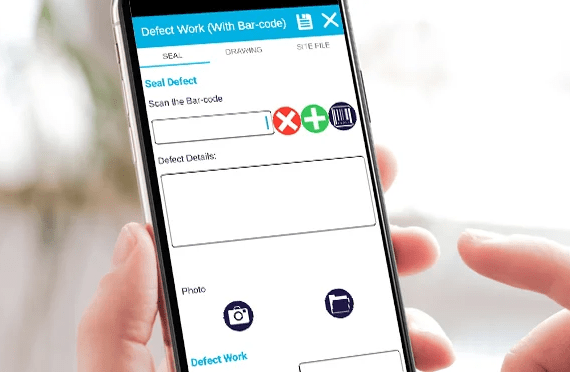
NFC, QR Code & Barcode Scanning
Field service businesses often manage assets: tools, equipment, spare parts, customer installations. BORIS integrates barcode, QR, and NFC (Near Field Communication) scanning:
- Asset management — Scan equipment or parts to log them against jobs, track ownership, and manage warranty
- Compliance records — Link NFC tags to safety equipment or PPE for automated log verification
- Job verification — On-site verification using barcode scans reduces dispute and improves audit trails
For example, a plumber can scan a boiler’s NFC tag to pull up its service history and next scheduled maintenance—all integrated into the job workflow.
Automated Notifications & Reminders

Email & SMS Alerts
BORIS sends automated notifications across your entire operation:
- Customer reminders — Automated pre-visit, appointment, and follow-up emails
- Compliance alerts — Automated reminders for MOT checks, service intervals, and periodic preventive maintenance (PPM)
- Team notifications — Job updates, schedule changes, and performance alerts sent to engineers and office staff
- SLA monitoring — Automatic escalation if response times aren’t being met
These aren’t basic emails—they’re configurable workflows that reduce manual admin and improve customer experience.
Why BORIS Needs Fewer Integrations
Here’s a candid comparison: with most general-purpose field service platforms, you’ll likely need separate tools for:
- Compliance & safety — Health & safety checklists, audits, sign-off workflows (you’ll want a specialist compliance tool)
- Fleet management — Fuel tracking, maintenance schedules, vehicle utilisation reports
- CRM — Customer communication history, lead tracking, contract management
- Workforce management — Timesheets, rotas, payroll integration
- Job costing — Cost tracking, profitability analysis, quoting
With BORIS, these capabilities are built in:
- Compliance modules — Built-in safety checklists, audit trails, automated PPE reminders
- Fleet management — Integrated vehicle and asset tracking with maintenance scheduling
- Customer database — Full CRM features without a separate tool
- Timesheet & attendance — Integrated time tracking linked to jobs and scheduling
- Cost analysis — Native job costing, parts tracking, and profitability reporting
This integrated approach means you’re not paying for overlapping subscriptions, training staff on disparate systems, or managing API integrations between incompatible tools.
Enterprise Custom Integrations
If you use accounting software, CRM systems, or operational tools beyond our standard integrations, BORIS’s Enterprise tier provides what you need.
What Enterprise Tier Includes
The Enterprise tier is designed for larger organisations and franchise networks that require:
- Fully bespoke custom integrations — Work with BORIS’s development team to integrate your existing tech stack
- API and webhook capabilities — Direct access to build custom workflows that fit your business
- Client portal — White-labelled customer interface for quotes, scheduling, and communication
- Ongoing integration development — Your dedicated development resources evolve integrations as your business changes
Common Enterprise Integration Scenarios
- QuickBooks or FreeAgent accounting — If you’re on different accounting platforms, BORIS can integrate with them
- Salesforce or HubSpot CRM — Sync customer data, communication history, and opportunity tracking
- Slack or Teams notifications — Route BORIS alerts into your existing team messaging
- Google Calendar or Outlook — Two-way sync between BORIS scheduling and your calendar system
- Payroll platforms — Direct integration with payroll providers for automated timesheet submission
- Specialist compliance tools — Link BORIS with industry-specific compliance or safety management systems
How It Works
- Scoping session — You meet with BORIS’s Enterprise team to map your existing systems and requirements
- Integration roadmap — BORIS builds an estimate and timeline based on technical complexity
- Development & testing — Your custom integration is built, tested with your data, and handed over with documentation
- Ongoing support — As your tools and processes evolve, Enterprise customers receive ongoing development support
This approach is transparent about what’s possible and what it costs, rather than offering vague promises of “integration flexibility.”
Integration Requests & Future Roadmap
BORIS’s product development is customer-driven. If you’re using an accounting package, CRM, or operational tool that isn’t currently integrated, we want to know.
Popular requests from the BORIS customer base have driven features like:
- Xero accounting integration (now standard)
- Mobile offline capability (now standard)
- Custom compliance workflows (now available)
- Real-time tracking and ETA
If you’re evaluating BORIS and integration with a specific tool is important, email our sales team or book a demo to discuss it. Many integrations that seem niche are actually common across field service businesses—and if there’s demand, BORIS’s development team will build it.
How to Get Started with BORIS Integrations
Professional Tier
If you’re using Xero accounting, the integration is already there. Set it up during onboarding in minutes.
For other integration needs, consider whether the capability is already built into BORIS (tracking, scheduling, compliance, CRM). You might be surprised what you don’t need.
Enterprise Tier
If you have multiple tools in your tech stack, request a demo with an Enterprise-focused consultant who can map your systems and discuss custom integration options.
Frequently Asked Questions
Xero is our primary accounting integration. However, Enterprise customers can explore custom QuickBooks integrations. Email our sales team to discuss your specific requirements—integration complexity varies, and we can advise whether it’s viable and what the timeline might be.
No. BORIS includes native fleet and asset tracking, service scheduling, fuel cost monitoring, and utilisation reports. Most businesses don’t need a separate tool. If you have very specialised fleet requirements (large multi-depot operations, specific fuel card integration), we’d discuss this during scoping.
BORIS includes built-in customer management (notes, communication history, contact preferences). If you need to sync BORIS with Salesforce, HubSpot, or another CRM, this falls under Enterprise custom integrations. During a demo, we can assess whether the integration is straightforward or requires more development.
Yes, via Enterprise custom integration. Many customers do this—supervisor alerts, job updates, and SLA breaches can all route to Teams channels. Again, this is something to discuss during Enterprise scoping.
Ready to Connect BORIS to Your Workflow?
BORIS’s integration approach is built around one principle: you shouldn’t need to cobble together five different tools to run a field service business. We’ve built the essentials in. For everything else, we’ve got the flexibility.
Book a demo to see how BORIS integrations fit into your current operations, or contact our sales team to discuss custom integration requirements.